How to buy the right PC.
By
John Goulas
Navigating the World of Computers: A Guide to Making Informed Choices
Imagine stepping onto a car dealership with the intention of
purchasing a vehicle. Your gaze is instantly captured by the latest
model, boasting an impressive 580 horsepower engine, a suite of
luxurious extras, and a sound system of such magnitude that it
necessitates ear protection. The car’s acceleration is so potent
that it promises to traverse the length of your driveway in reverse
at breakneck speeds. But the question arises: is such extravagance
necessary?
The answer for most would be a resounding no. A reliable 1989 Toyota
Corolla, for instance, would suffice, capable of fulfilling its
purpose without the need for constant maintenance. This analogy
extends to the realm of computers. Why do consumers demand so much
from their devices when the primary uses—such as email and web
browsing—require minimal specifications?
The key to purchasing a computer lies in finding one that aligns
with your needs and performs the tasks you require efficiently. The
technological landscape is rapidly evolving, with daily advancements
boasting faster speeds, more cores, and increasingly compact chips.
While these developments are enticing, they often exceed the
requirements of the average user.
When selecting a computer, it is crucial to ensure it meets the
minimum specifications to run contemporary software. A mere 4
megabytes of RAM is insufficient in today’s standards; a minimum of
2 gigabytes is necessary for basic operations, with most systems
offering between 4 to 16 gigabytes as a standard feature.
Additionally, a monitor and printer are essential peripherals. While
high-color displays and advanced printers are available, they may
not be necessary for everyday use, and standard models often
suffice.
Regarding internet connectivity, options range from direct
connections to modems. Although direct connections may be
cost-prohibitive for some, modem technology has advanced
significantly. The once-standard 56K modem has given way to ADSL and
fiber options, offering speeds from 512Kbps to an astonishing
500,000Kbps, as well as wireless alternatives. However, these higher
speeds represent an investment and come with a corresponding price
tag.
In conclusion, investing in a computer is akin to investing in a
vehicle. It is about finding a balance between performance and
practicality, ensuring that the device serves your needs without
unnecessary excess. Whether you seek the pinnacle of performance or
simply a means to ‘get there,’ the market offers a spectrum of
choices to suit every requirement.
Things to consider when buying a PC
 What is the primary purpose of the PC.
What operating systems are you intending to
use. ( Windows 10 | Windows 11 , 32bit or 64bit
platform ?
Do you need to be connected on the World Wide
Web. (Fibre / Wireless)
Is e-mail a requirement. (Anti-Virus is a
must).
Do you need to send & receive
large files. (Office 365)
Are you going to play games on your PC
or use Graphic Design Software.
(Dedicated Graphic Card Essential)
Do you need to produce hardcopies of your
work ? ie: Printer / Black & white or colour.
(Inkjet / Laser ?)
Do you need to backup your work ? (A must
against data loss !) Flash
disks/ NAS Storage /Cloud Services etc)
Do you want to listen to Music or watch
movies on your pc, ie: Sound card & Good Speakers.
Do you need to scan in documents
electronically, ie: Scanner / All in one printer.
What
size screen do you need - If your eyesight is good a 19" will do,
24" recommended.
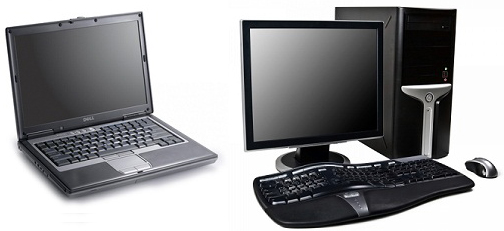
Need to be mobile, than maybe a
laptop
or tablet will
be preferred. especially with load shedding.
Look at your warranty period & your after
sales service. (Extended Warranties Available)
How much is it
costing you to run old Pcs?